Thursday, March 29, 2018

How to download your Facebook data

1) Go to settings from here

2) go to General

3) Click on Download data
4) select archive


5) Enter your password
6) Start it
7) Confirmation


Wednesday, April 19, 2017

JIRA Query users mentioned in issue using JQL

project = "KEY" and (summary ~ currentUser() OR description ~ currentUser() OR comment ~ currentUser()) and updatedDate >= -7d

Monday, November 14, 2016

Convert Oracle date to int using native Microsoft date

SQL Server/Excel

select getdate() 'Today',convert(int,getdate())

2016-11-14 16:05:35.207 42687

Oracle

select current_date,cast(current_date - date '1900-01-01' as int)
from dual;

14-NOV-16 42687

Thursday, November 10, 2016

Oracle subtract days/Hours from current timestamp


select to_timestamp(to_char(systimestamp + INTERVAL '-1' DAY, 'dd-mon-yy hh.mi.ss.ff4 AM')) from dual; ------ -1 day


select to_timestamp(to_char(systimestamp + INTERVAL '-2' HOUR, 'dd-mon-yy hh.mi.ss.ff4 AM')) from dual; ----- -2 hours current date time


select to_timestamp(to_char(systimestamp + INTERVAL '-1' DAY, 'dd-mon-yy hh.mi.ss.ff4 AM')) + INTERVAL '-2' HOUR from dual; ------- -2 hours -1 day

Thursday, August 25, 2016

Change Linux root user password of Cloudera Hadoop nodes

Cloudera Manager only uses the root credentials when adding a new node to the cluster. Once the node has been added and the Cloudera Manager agent deployed the server will no longer use the root credentials.

i.e.  Once your cluster is set up, you can safely change the root password. Cloudera Manager does not save SSH credentials and all credential information is discarded once the installation is complete.


Changing the root password will not affect any currently deployed services. Nodes talk to each other o SSH key based authentication 

sh-4.2# passwd root
New password: 
Retype new password:
passwd:all authentication tokens updated successfully.

Monday, June 29, 2015

Splunk useful commands

put cluster in maintenance mode

$SPLUNK_HOME/bin/splunk enable maintenance-mode

rolling restart


splunk rolling-restart cluster-peers


Daily License volume by host

index=_internal source=*license_usage.log type=Usage 
 | stats sum(b) as bytes by h 
 | eval MB = round(bytes/1024/1024,1)
 | fields h MB
 | rename h as host


Find AD account lockout status in Splunk

EventCode=4740 Account_Name=<account name>


Friday, May 29, 2015

Command to recursively delete files older than N days

this command will delete all files inside c:\Folder and subfolders which are older than <Number of Days>

forfiles -p "C:\Folder" -s -m *.* /D -<Number of Days> /C "cmd /c del @path"

Wednesday, April 22, 2015

List of Splunk universal forwarders with client OS & version

index=_internal source=*metrics.log group=tcpin_connections | eval sourceHost=if(isnull(hostname), sourceHost,hostname) | dedup sourceHost | table sourceHost sourceIP os version | sort version

Friday, March 27, 2015

Linux Commands

List all Linux users

cut -d: -f1 /etc/passwd

set password never to expire

chage -I -1 -m 0 -M 99999 -E -1 username

find process uptime

systemctl status splunk

Thursday, September 25, 2014

Linux Check last password change, expire date & other info

$chage -l root

Output

Last password change                                    : Sep 25, 2014
Password expires                                        : never
Password inactive                                       : never
Account expires                                         : never
Minimum number of days between password change          : 0
Maximum number of days between password change          : 99999

Number of days of warning before password expires       : 7

 Other options

  -d, --lastday LAST_DAY        set last password change to LAST_DAY
  -E, --expiredate EXPIRE_DATE  set account expiration date to EXPIRE_DATE
  -h, --help                    display this help message and exit
  -I, --inactive INACTIVE       set password inactive after expiration
                                to INACTIVE
  -l, --list                    show account aging information
  -m, --mindays MIN_DAYS        set minimum number of days before password
                                change to MIN_DAYS
  -M, --maxdays MAX_DAYS        set maximim number of days before password
                                change to MAX_DAYS
  -W, --warndays WARN_DAYS      set expiration warning days to WARN_DAYS


Monday, July 14, 2014

Remote connection to Oracle database using SQL*Plus

sqlplus "uname/pwd@ (DESCRIPTION = (ADDRESS = (PROTOCOL = TCP)(HOST = host.network.com)(PORT = 1521)) (CONNECT_DATA = (SERVER = DEDICATED) (SERVICE_NAME = orcl.network.com) ) )"

Friday, July 11, 2014

Script to recreate all tablespaces

select 'create tablespace ' || df.tablespace_name || chr(10)
 || ' datafile ''' || df.file_name || ''' size ' || df.bytes
 || decode(autoextensible,'N',null, chr(10) || ' autoextend on maxsize '
 || maxbytes)
 || chr(10)
 || 'default storage ( initial ' || initial_extent
 || decode (next_extent, null, null, ' next ' || next_extent )
 || ' minextents ' || min_extents
 || ' maxextents ' ||  decode(max_extents,'2147483645','unlimited',max_extents)
 || ') ;'
 from dba_data_files df, dba_tablespaces t
 where df.tablespace_name=t.tablespace_name

Thursday, June 26, 2014

Oracle 12c SQL Error: ORA-65096: invalid common user or role name

Oracle 12c allows either a common user or local user to be created. Common user is created in container database. Common user name starts with c## and local user is created in plugged database

To find container database name

SQL> sho con_name

CON_NAME
------------------------------
CDB$ROOT

To find plugged databases

SQL> select name,open_mode from v$pdbs;

NAME                           OPEN_MODE
------------------------------ ----------
PDB$SEED                       READ ONLY
PDBORCL                        MOUNTED

To create a common user in CDB$ROOT

SQL> create user c##dummyuser identified by dummypwd;

To create a local user in PDB first set a dummy container

SQL> alter session set container=TEST;

Session altered.

SQL> create user test identified by test;

You cannot create a common user while in test session so if you try following you will get error

SQL> create user c##dummyuser identified by test;
create user c##dummyuser identified by test
            *
ERROR at line 1:
ORA-65094: invalid local user or role name

Note:-
The reason for the error is that Local user name cannot be started with C##.

Tuesday, June 24, 2014

Oracle 11g Installation error WFMLRSVCApp.ear not found

While installing Oracle 11g I got following error "WFMLRSVCApp.ear not found"


Solution

  1. Download both files from OTN
    win64_11gR2_database_1of2.zip
    win64_11gR2_database_2of2.zip
  2. Extract them to a single directory. In my case c:\Setup\disk1 & Disk2
  3. Copy contents of C:\Setup\Disk2\database\stage\Components to C:\Setup\Disk1\database\stage\Components
  4. Run setup.exe under C:\Setup\Disk1\database as administrator.

Thursday, October 10, 2013

Script to find seed, Increment and Current Identity value of all tables

SELECT 
IDENT_SEED(TABLE_NAME) AS Seed,
IDENT_INCR(TABLE_NAME) AS Increment,
IDENT_CURRENT(TABLE_NAME) AS Current_Identity,
TABLE_NAME
FROM 
INFORMATION_SCHEMA.TABLES
WHERE 
OBJECTPROPERTY(OBJECT_ID(TABLE_NAME), 'TableHasIdentity') = 1
AND TABLE_TYPE = 'BASE TABLE'

Monday, July 22, 2013

How to quickly create a large test file for SQLIO?

Easiest way is to use FSUTIL.EXE tool which comes with all versions of Windows.

Following command will create a 2TB file.

PS C:\> FSUTIL.EXE File CreateNew D:\TestFile.DAT (2TB)
File D:\TestFile.DAT is created

Please note that CREATENEW will take longer time since it actually initializes the block to the size you mentioned (2TB in example) so easier way is to use SETVALIDDATA. This just moves the end of file marker. 

!!!Be very careful while doing this as it will overwrite already existing data!!!

PS C:\> FSUTIL.EXE File SetValidData D:\TestFile.DAT (2TB)
Valid data length is changed

To use the file size in GB or TB you must run these commands thru PowerShell. Else you must give size in bytes

Thursday, July 18, 2013

IOPS Calculator and SQLIO

I was asked by my storage admins what is SQLIO and how does it calculate IOPS throughput. And here is the how (What is SQLIO is none of their business)

So this is how output of SQLIO looks like

C:\Program Files (x86)\SQLIO>sqlio -kR -t64 -s120 -o128 -frandom -b64 -BH -LS -Fparam.txt 
sqlio v1.5.SG
using system counter for latency timings, 14318180 counts per second
parameter file used: param.txt
file D:\testfile.dat with 2 threads (0-1) using mask 0x0 (0)
file E:\testfile.dat with 2 threads (2-3) using mask 0x0 (0)
file S:\testfile.dat with 2 threads (4-5) using mask 0x0 (0)
6 threads reading for 120 secs from files D:\testfile.dat, E:\testfile.dat and S:\testfile.dat
using 64KB random IOs
enabling multiple I/Os per thread with 128 outstanding
buffering set to use hardware disk cache (but not file cache)
using specified size: 100000 MB for file: D:\testfile.dat
using specified size: 100000 MB for file: E:\testfile.dat
using specified size: 90000 MB for file: S:\testfile.dat
initialization done
CUMULATIVE DATA:
throughput metrics:
IOs/sec: 10717.27
MBs/sec:   669.83
latency metrics:
Min_Latency(ms): 8
Avg_Latency(ms): 71
Max_Latency(ms): 122
histogram:
ms: 0  1  2  3  4  5  6  7  8  9 10 11 12 13 14 15 16 17 18 19 20 21 22 23 24+
%:  0  0  0  0  0  0  0  0  0  0  0  0  0  0  0  0  0  0  0  0  0  0  0  0 100

And here is the formula used to calculate IOPS

IOPS = (MBps Throughput / KB per IO) * 1024

Based on above throughput of SQLIO will be

10717.27 = (669.83 * 64) / 1024

Tuesday, May 28, 2013

Secondary Replica of AlwaysOn Availability group is in "Resolving" state after fail over

While testing AlwaysOn Availability groups I failed over primary to secondary couple of times. However 3rd time when I failed over the secondary did not come up immediately and was in “Resolving” state.

Problem was with maximum failures threshold. By default it is set to 2 failures in 6 hours.


So since I failed over AG more than 2 times within an hour it tripped the maximum failures threshold for this clustered resource and came up with “Resolving” state.

Solution 1: wait for default period of 6 hours.
Solution 2: Change the threshold and fail back to original primary.

Default failback setting is set to immediate. I would also recommend setting it to Prevent Failback.

Here is how I have configured my availability group clustered resource


Following KB also has other scenarios

http://support.microsoft.com/kb/2833707?wa=wsignin1.0

Please note that I used these configurations only for testing. You may need to reconsider for your production setup depending your fail over needs


Friday, May 17, 2013

Error while adding Replica to SQL Server 2012 AlwaysOn Availability group


Problem: While adding secondary replica to AlwaysOn Availability group you get following error


TITLE: Connect to Server
------------------------------
Cannot connect to REPLICASERVER.
------------------------------
ADDITIONAL INFORMATION:
A network-related or instance-specific error occurred while establishing a connection to SQL Server. The server was not found or was not accessible. Verify that the instance name is correct and that SQL Server is configured to allow remote connections. (provider: Named Pipes Provider, error: 40 - Could not open a connection to SQL Server) (Microsoft SQL Server, Error: 5)
For help, click: http://go.microsoft.com/fwlink?ProdName=Microsoft%20SQL%20Server&EvtSrc=MSSQLServer&EvtID=5&LinkId=20476

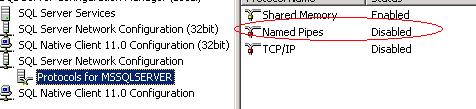
Solution: Most likely Named Pipe provider for SQL is disabled on secondary instance


Open SQL Server Configuration Manager and click on Protocols for MSSQLSERVER under SQL Server Network Configuration

Enable Named Pipes provides


Restart SQL Services

Then try adding the replica again in New AlwaysOn Availability Group Wizard


Error when opening New AlwaysOn Availability Group Wizard in SSMS 2012


Problem: If you are setting up availability group using New AlwaysOn Availability Group Wizard and if you get following error message.


TITLE: Microsoft SQL Server Management Studio
------------------------------
The local node is not part of quorum and is therefore unable to process this operation. This may be due to one of the following reasons:
•   The local node is not able to communicate with the WSFC cluster.
•   No quorum set across the WSFC cluster.
 For more information on recovering from quorum loss, refer to SQL Server Books Online.
(Microsoft.SqlServer.Management.HadrTasks)


Solution 1: Go to SQL Server Configuration Wizard and disable AlwaysOn High Availability 


Restart SQL.
After restart enable AlwaysOn High Availability again thru SQL Configuration Manager. 
Restart SQL Services
and try again to open the wizard

Solution 2: make sure all pre-requisites are setup properly. Refer to following link