Thursday, June 26, 2014

Oracle 12c SQL Error: ORA-65096: invalid common user or role name

Oracle 12c allows either a common user or local user to be created. Common user is created in container database. Common user name starts with c## and local user is created in plugged database

To find container database name

SQL> sho con_name

CON_NAME
------------------------------
CDB$ROOT

To find plugged databases

SQL> select name,open_mode from v$pdbs;

NAME                           OPEN_MODE
------------------------------ ----------
PDB$SEED                       READ ONLY
PDBORCL                        MOUNTED

To create a common user in CDB$ROOT

SQL> create user c##dummyuser identified by dummypwd;

To create a local user in PDB first set a dummy container

SQL> alter session set container=TEST;

Session altered.

SQL> create user test identified by test;

You cannot create a common user while in test session so if you try following you will get error

SQL> create user c##dummyuser identified by test;
create user c##dummyuser identified by test
            *
ERROR at line 1:
ORA-65094: invalid local user or role name

Note:-
The reason for the error is that Local user name cannot be started with C##.

Tuesday, June 24, 2014

Oracle 11g Installation error WFMLRSVCApp.ear not found

While installing Oracle 11g I got following error "WFMLRSVCApp.ear not found"


Solution

  1. Download both files from OTN
    win64_11gR2_database_1of2.zip
    win64_11gR2_database_2of2.zip
  2. Extract them to a single directory. In my case c:\Setup\disk1 & Disk2
  3. Copy contents of C:\Setup\Disk2\database\stage\Components to C:\Setup\Disk1\database\stage\Components
  4. Run setup.exe under C:\Setup\Disk1\database as administrator.

Thursday, October 10, 2013

Script to find seed, Increment and Current Identity value of all tables

SELECT 
IDENT_SEED(TABLE_NAME) AS Seed,
IDENT_INCR(TABLE_NAME) AS Increment,
IDENT_CURRENT(TABLE_NAME) AS Current_Identity,
TABLE_NAME
FROM 
INFORMATION_SCHEMA.TABLES
WHERE 
OBJECTPROPERTY(OBJECT_ID(TABLE_NAME), 'TableHasIdentity') = 1
AND TABLE_TYPE = 'BASE TABLE'

Monday, July 22, 2013

How to quickly create a large test file for SQLIO?

Easiest way is to use FSUTIL.EXE tool which comes with all versions of Windows.

Following command will create a 2TB file.

PS C:\> FSUTIL.EXE File CreateNew D:\TestFile.DAT (2TB)
File D:\TestFile.DAT is created

Please note that CREATENEW will take longer time since it actually initializes the block to the size you mentioned (2TB in example) so easier way is to use SETVALIDDATA. This just moves the end of file marker. 

!!!Be very careful while doing this as it will overwrite already existing data!!!

PS C:\> FSUTIL.EXE File SetValidData D:\TestFile.DAT (2TB)
Valid data length is changed

To use the file size in GB or TB you must run these commands thru PowerShell. Else you must give size in bytes

Thursday, July 18, 2013

IOPS Calculator and SQLIO

I was asked by my storage admins what is SQLIO and how does it calculate IOPS throughput. And here is the how (What is SQLIO is none of their business)

So this is how output of SQLIO looks like

C:\Program Files (x86)\SQLIO>sqlio -kR -t64 -s120 -o128 -frandom -b64 -BH -LS -Fparam.txt 
sqlio v1.5.SG
using system counter for latency timings, 14318180 counts per second
parameter file used: param.txt
file D:\testfile.dat with 2 threads (0-1) using mask 0x0 (0)
file E:\testfile.dat with 2 threads (2-3) using mask 0x0 (0)
file S:\testfile.dat with 2 threads (4-5) using mask 0x0 (0)
6 threads reading for 120 secs from files D:\testfile.dat, E:\testfile.dat and S:\testfile.dat
using 64KB random IOs
enabling multiple I/Os per thread with 128 outstanding
buffering set to use hardware disk cache (but not file cache)
using specified size: 100000 MB for file: D:\testfile.dat
using specified size: 100000 MB for file: E:\testfile.dat
using specified size: 90000 MB for file: S:\testfile.dat
initialization done
CUMULATIVE DATA:
throughput metrics:
IOs/sec: 10717.27
MBs/sec:   669.83
latency metrics:
Min_Latency(ms): 8
Avg_Latency(ms): 71
Max_Latency(ms): 122
histogram:
ms: 0  1  2  3  4  5  6  7  8  9 10 11 12 13 14 15 16 17 18 19 20 21 22 23 24+
%:  0  0  0  0  0  0  0  0  0  0  0  0  0  0  0  0  0  0  0  0  0  0  0  0 100

And here is the formula used to calculate IOPS

IOPS = (MBps Throughput / KB per IO) * 1024

Based on above throughput of SQLIO will be

10717.27 = (669.83 * 64) / 1024

Tuesday, May 28, 2013

Secondary Replica of AlwaysOn Availability group is in "Resolving" state after fail over

While testing AlwaysOn Availability groups I failed over primary to secondary couple of times. However 3rd time when I failed over the secondary did not come up immediately and was in “Resolving” state.

Problem was with maximum failures threshold. By default it is set to 2 failures in 6 hours.


So since I failed over AG more than 2 times within an hour it tripped the maximum failures threshold for this clustered resource and came up with “Resolving” state.

Solution 1: wait for default period of 6 hours.
Solution 2: Change the threshold and fail back to original primary.

Default failback setting is set to immediate. I would also recommend setting it to Prevent Failback.

Here is how I have configured my availability group clustered resource


Following KB also has other scenarios

http://support.microsoft.com/kb/2833707?wa=wsignin1.0

Please note that I used these configurations only for testing. You may need to reconsider for your production setup depending your fail over needs


Friday, May 17, 2013

Error while adding Replica to SQL Server 2012 AlwaysOn Availability group


Problem: While adding secondary replica to AlwaysOn Availability group you get following error


TITLE: Connect to Server
------------------------------
Cannot connect to REPLICASERVER.
------------------------------
ADDITIONAL INFORMATION:
A network-related or instance-specific error occurred while establishing a connection to SQL Server. The server was not found or was not accessible. Verify that the instance name is correct and that SQL Server is configured to allow remote connections. (provider: Named Pipes Provider, error: 40 - Could not open a connection to SQL Server) (Microsoft SQL Server, Error: 5)
For help, click: http://go.microsoft.com/fwlink?ProdName=Microsoft%20SQL%20Server&EvtSrc=MSSQLServer&EvtID=5&LinkId=20476

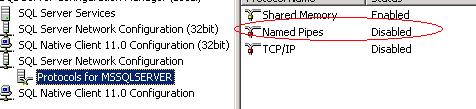
Solution: Most likely Named Pipe provider for SQL is disabled on secondary instance


Open SQL Server Configuration Manager and click on Protocols for MSSQLSERVER under SQL Server Network Configuration

Enable Named Pipes provides


Restart SQL Services

Then try adding the replica again in New AlwaysOn Availability Group Wizard